Enter the IMEI of the device (iPhone/iPad) that you want to unlock.
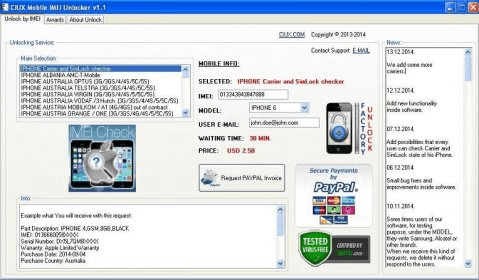
If for any reason a device is locked, then there are several tool and software that you can use to unlock it. You are only required to get the IMEI number as I already guided you above and get an effective tool to unlock it. Most of these apps are found freely on different app stores. However, others are available at a cost. Through this software, you can do Flash, repair IMEI, Format, Unlock Phone, unlock privacy Lock, Read & write Firmware, GSM crack, FRP flash and so on. All kind of hardware issue related solution will also be available here. IMEI-Unlocker This is an app that has been developed by legendary unlocking website imei-unlocker.com service. It works very easily. All you need to do is launch the app and the tap the unlock button from the dashboard, choose the device and then enter the IMEI number of the locked device. International Mobile Equipment Identity is also known as the IMEI number. If your IMEI number has any trouble and you want to change it, you need to download the MTK IMEI repair tool to fix the IMEI number. In many countries, the IMEI number repair or changing is not legal. So, take your own risk MTK IMEI Repair Tool V1.1916.00 All Version List 2021 Read More ». With this tool, you can unlock or bypass your iCloud lock in less than 10 minutes, one of the fastest in the business. It works well on all iOS devices and all versions of iOS. You can also use it to get the device's IMEI code to unlock the iPhone.
Select Features
Choose which features you want to use, all options are fully functional. After you finish, click on 'START' button.
Note: This tool is undetectable and 100% safe to use and no trace is left behind, everything is done by dedicated & vps proxies on our servers.

Compatibility
Supported Mobile Devices:
iPhone 4, iPhone 4S, iPhone 5, iPhone 5C, iPhone 5S, iPhone SE, iPhone 6, iPhone 6 Plus, iPhone 6S, iPhone 6S Plus, iPhone 7, iPhone 7 Plus, iPhone 8, iPhone 8 Plus, iPhone X, iPhone Xs, X MAX, iPhone 11, 11 Pro, 11 Pro Max
Supported Tablet Devices:
iPad, iPad 2, iPad (3rd generation), iPad (4th generation), iPad mini, iPad mini 2, iPad mini 3, iPad mini 4, iPad Air, iPad Air 2, iPad Pro (12.9 inch 1st, 2nd & 3rd Gen), iPad Pro (9.7 inch)
Supported iOS Versions:
Any iOS version is supported, from iOS 6 to iOS 13.3
Recent Reviews
P. Neil: Great service, much appreciated! Best feature of this tool is that if you forgot your iCloud password and cannot unlock it, you can use it to unlock your locked device for free.

Imei Unlocker Software Tool Online
As you know we're providing this service Absolutely Free of Cost but we have to pay for some dedicated/vps server, proxies and other scripts charges.
So please complete one of the offers (or install an app) from our sponsors by clicking the button below which will help us to bear server/hosting/scripts charges. You can read more about completing an offer HERE .

Imei Unlocker Software
We respect your privacy and do not tolerate spam and will never sell or give any information away. After completion, the system will redirect you to rest of process and summary.
We offer you an FRP unlock service that works for all Android devices such as Samsung, LG, Huawei, Sony, HTC, Nokia, MTK and others. Our method to delete FRP Google Account Lock is very simple to use. You can do this using our Windows-only Tool. This software does not work for Mac. You must have a Windows PC and a USB cable to connect your mobile device.
You need to send us the IMEI code and choose the mobile device model, for example, Samsung. The next step is to make a payment. We will prepare the software specifically for your IMEI code and send it to you by email with complete instructions in a few hours.
You do not need to have any high computer skills to use our FRP Removal Tool. The whole procedure is done in two steps. With one click, install the FRP Bypass Tool, connect your mobile device with a USB cable and click on the FRP Unlock button. This process takes up to a minute, and you have a brand new factory reset mobile device that does not have an FRP lock.
What is required to use this service?
- You need to have the internet on your computer.
- Our FRP Bypass Tool only works on Windows 10/8/7. OS (does not work on Mac devices).
- USB cable for your Android device.
- Find the IMEI code of your device – (Go to this guide to learn how to find the IMEI of your Android device).
What is the Unlocking Process?
- You place an order with us.
- You will receive a username and password for the tool’s login, the FRP Unlock Tool, and complete instructions in a few hours.
- Install the tool on your Windows PC, connect to a USB cable, and remove the FRP lock permanently.
- The process is complete; congratulations.
Note: This tool will only remove the FRP lock. If your Android device is locked to the Sim network. Then you need to use Sim Network Unlock Pin services from our list here.
If you have any questions feel free to write us a message, or in the comment below, we will answer.